VPN, Surveillance, and Corporate Access

```

What is visible, what is not – and what can be reconstructed?

Many users assume that a VPN makes them anonymous and completely hides their origin. This is incorrect.

A VPN can improve privacy and protect traffic between your device and the VPN endpoint, but it does not provide anonymity. It also does not prevent identification through accounts, authentication systems, device information, or other available logs.

This becomes particularly relevant when accessing corporate networks from abroad, for example from Thailand.

1. DOES A VPN MAKE YOU ANONYMOUS?

Clearly: No.

A VPN encrypts traffic between your device and the VPN endpoint. For an ordinary internet connection, this means your ISP normally cannot see the contents of the traffic inside the VPN tunnel.

However, the VPN provider becomes another party that must be trusted. Depending on the VPN technology, configuration, and logging policy, the provider may have access to connection information such as your source IP address, connection times, and the VPN endpoint used.

A VPN:

• Protects traffic against many forms of interception on untrusted networks
• Prevents your ISP from normally seeing the contents of traffic inside the VPN tunnel
• Does not replace your identity, login credentials, MFA, certificates, or device identity
• Does not make you invisible to the systems you access

A VPN improves privacy. It does not create anonymity.

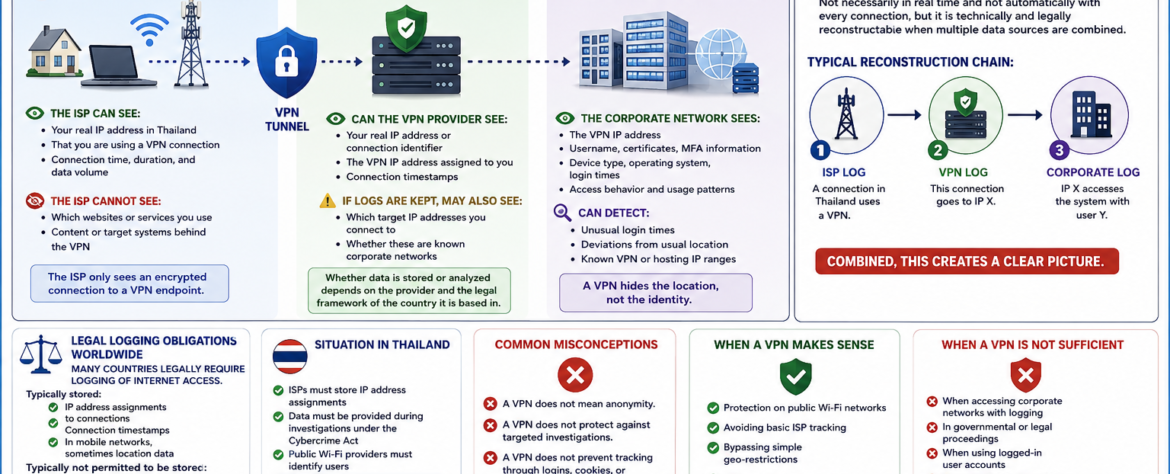
2. WHO SEES WHAT WHEN USING A VPN?

Internet Service Provider (ISP) in Thailand

The ISP can generally see:

• Your real IP address or network connection
• That your device is communicating with a VPN endpoint
• Connection times and other network metadata
• The amount of traffic being transferred

The ISP normally cannot see through the VPN tunnel:

• The contents of the encrypted VPN traffic
• The specific internal resources accessed through an encrypted corporate VPN
• The contents of properly encrypted applications carried inside the tunnel

The ISP therefore sees a connection to the VPN endpoint rather than the complete activity taking place inside the VPN.

VPN Provider

Depending on the service and configuration, the VPN provider may have access to:

• Your source IP address
• The VPN IP address assigned to your connection
• Connection timestamps
• Traffic volume and other connection metadata

If the provider keeps appropriate logs, additional information may potentially be available.

However, this does not mean that every VPN provider can see everything you do. Encryption used by websites and applications, such as HTTPS, can remain in place beyond the VPN tunnel.

Whether relevant information is stored depends on the provider, its technical architecture, its logging practices, and the applicable legal framework.

Target System – For Example, a Corporate Network

The corporate network can potentially see:

• The VPN or gateway IP address from which the connection arrives
• Username and account information
• Certificates and MFA information
• Device information
• Operating system information
• Login times and access times
• Access behavior and usage patterns

A properly administered corporate environment may also detect:

• Unusual login times
• Unexpected geographic patterns or changes in normal access behavior
• Known VPN, hosting, or datacenter IP ranges
• Simultaneous or unusual sessions
• Changes in device or authentication characteristics

A VPN can hide the original network address from the target system, but it does not hide the identity used to authenticate to that system.

3. CAN IT BE DETERMINED THAT I AM ACCESSING A CORPORATE NETWORK FROM THAILAND VIA VPN?

Yes, it can be possible.

It is not necessarily possible in real time, and it is not guaranteed with every VPN configuration.

However, when relevant records from different systems exist and can legally and technically be correlated, they can potentially reconstruct where a connection originated.

A simplified reconstruction chain could look like this:

1 → ISP RECORD

A connection from Thailand establishes a connection to a VPN endpoint.

2 → VPN RECORD

The VPN provider has a record connecting that VPN session with a particular source connection or IP address.

3 → CORPORATE RECORD

The corporate system records that the VPN IP address accessed the system using user Y.

4 → CORRELATION

If the relevant records contain compatible timestamps and identifiers, the different records can potentially be correlated.

The important point is this: reconstruction depends on the existence, quality, retention, and lawful availability of the relevant records.

A VPN therefore does not make such reconstruction impossible.

4. LEGAL LOGGING OBLIGATIONS WORLDWIDE

Many countries have laws and regulations governing the retention or disclosure of certain telecommunications or computer traffic data.

The exact requirements vary considerably between countries, service providers, technologies, and circumstances.

Depending on the jurisdiction and service, records may include information such as:

• IP address assignments
• Connection timestamps
• Subscriber or account information
• Traffic or connection metadata
• Other information required by applicable law

This should not be confused with automatically recording the complete content of every communication.

Different laws apply to traffic data, subscriber information, and communication content.

5. SITUATION IN THAILAND

Thailand has legal requirements concerning the retention of computer traffic data by covered service providers.

The relevant regulations specify retention requirements for computer traffic data, with a standard minimum retention period of 90 days and provisions allowing longer retention in certain circumstances.

This does not mean that the Thai authorities continuously monitor the activity of every internet user.

It means that certain providers may have legally defined obligations to retain specified traffic information and may be required to provide information through the applicable legal process.

The exact obligations depend on the type of provider and the circumstances.

The important distinction is between continuous surveillance and the ability to reconstruct events from retained technical records.

6. COMMON MISCONCEPTIONS

A VPN does not mean anonymity.

A VPN does not prevent targeted investigations.

A VPN does not prevent tracking through logins, cookies, browser characteristics, device information, or authentication systems.

A VPN is not a legal shield.

A VPN does not erase the logs created by the systems you access.

7. WHEN A VPN MAKES SENSE

A VPN is useful for:

• Protecting traffic on public or untrusted Wi-Fi networks
• Preventing the local network from directly seeing the contents of VPN-protected traffic
• Reducing the amount of browsing information visible to the ISP
• Connecting securely to corporate or private networks
• Improving privacy in certain network environments

A VPN can therefore be an important security tool when it is configured and used correctly.

8. WHEN A VPN IS NOT SUFFICIENT

A VPN is not sufficient by itself:

• When accessing corporate systems that use authentication and logging
• When the destination system records account and device information
• When multiple systems can correlate connection records
• In governmental or legal investigations
• When legal or regulatory obligations apply

A VPN protects a network connection. It does not override the security, logging, authentication, or legal requirements of the systems involved.

9. CONCLUSION

A VPN:

• Shifts some trust from the ISP to the VPN provider
• Can hide your original IP address from the destination system
• Does not hide your authenticated identity from a corporate system
• Does not automatically prevent correlation of technical records
• Provides technical and privacy protection, not legal immunity

Anyone who believes they are “invisible” when using a VPN misunderstands the reality of modern networks and logging systems.

A VPN is a security and privacy tool, not a promise of anonymity or legal protection.
```

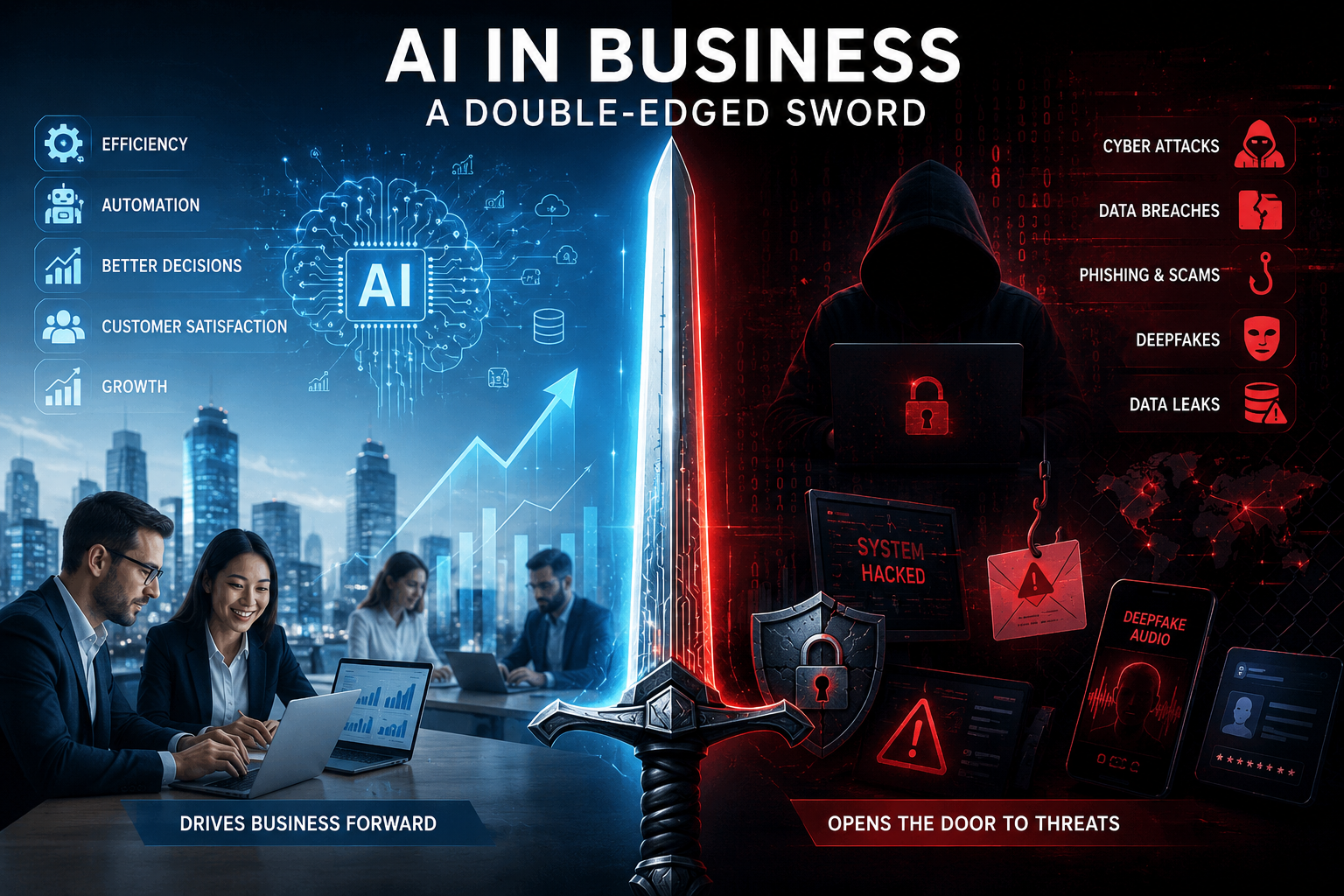
AI in Business: A Double-Edged Sword

```

Using artificial intelligence (AI) in business is like using a double-edged sword. On one side, AI helps companies work faster, save money, and improve productivity. On the other side, if AI is not used safely, it can create new opportunities for cybercriminals.

AI is no longer just a popular topic. It has become an important business tool. Companies of all sizes use AI to automate routine work, improve customer service, analyze data faster, and make better business decisions. Today, most companies are no longer asking if they should use AI. Instead, they are asking how quickly they can start using it.

There is a good reason for this excitement. AI offers many real business benefits. But like every powerful technology, it also brings new risks. If companies do not manage AI properly, the same technology that helps them grow can also help cybercriminals attack them.

AI Is Changing the Way Businesses Work

AI is changing almost every part of modern business.

Marketing teams use AI to write articles, advertisements, and social media posts. Software developers use it to write computer code. Customer service teams use AI chatbots to answer customer questions 24 hours a day. Finance departments use AI to predict future business trends, while logistics companies use it to find the fastest and cheapest delivery routes.

The benefits are clear.

AI helps companies save time, reduce costs, increase productivity, and make better decisions based on data.

Cybersecurity teams also use AI. It can examine millions of events every second and quickly find unusual or suspicious activity that people or traditional security software might miss.

It is easy to understand why AI has become such an important business tool.

Every new technology brings new risks.

Every major technology has changed the way businesses work. But every new technology has also created new security problems.

The internet made communication easier but also created cybercrime.

Cloud computing gave businesses more flexibility but introduced new security challenges.

AI is following the same path.

As companies connect AI to more business systems, they also create more ways for attackers to enter their networks. Many companies are adopting AI faster than they are protecting it, and this creates unnecessary risks.

Cybercriminals Are Using AI Too

Many people think AI only helps businesses.

Unfortunately, criminals are using the same technology.

Today, phishing emails are much more convincing than before. AI can write professional emails without spelling mistakes and can personalize every message using information from LinkedIn, company websites, or social media.

AI can also copy a person’s voice or create realistic fake videos, known as deepfakes.

In one well-known case, an employee joined what looked like a normal video meeting with company executives. In reality, everyone else in the meeting was created by AI. The employee believed the meeting was real and transferred about US$25 million to criminals.

This shows how dangerous AI-powered scams have become.

Shadow AI – A Risk Inside the Company

Not every AI risk comes from hackers.

Sometimes the biggest risk comes from employees who simply want to work faster.

Many employees copy company information into public AI tools without thinking about the consequences. They may upload contracts, customer information, financial reports, source code, or confidential business plans.

This is called Shadow AI.

Once confidential information is uploaded to a public AI platform, the company may lose control over where the data is stored, who can access it, or how long it will remain there.

For companies working with customer information, financial data, healthcare records, or valuable intellectual property, this can become a serious security and legal problem.

AI Systems Can Also Be Attacked

AI itself can become a target.

Attackers may try to change the data used to train AI systems so they make wrong decisions. They may try to steal expensive AI models or trick AI systems into ignoring security rules.

As AI becomes connected to email systems, databases, accounting software, and other business applications, the possible damage from these attacks becomes much greater.

The smarter AI becomes, the more attractive it becomes to cybercriminals.

Security Must Come First

Many companies focus on installing AI but forget to think about security.

This is like installing a high-quality alarm system while leaving the front door open.

Companies need clear rules about:

  • Which AI tools employees may use.
  • What company information may be shared with AI.
  • Who is allowed to use AI systems.
  • How AI systems are monitored and protected.

International standards such as the NIST AI Risk Management Framework, ISO/IEC 42001, and the EU AI Act can help companies build these rules.

AI security is not only the responsibility of the IT department. Company management must also be involved.

People Are Still the Best Protection

Technology alone cannot stop cybercrime.

Employees need regular training so they understand both the benefits and the risks of AI.

Companies should combine employee awareness, strong passwords, access controls, continuous monitoring, and human supervision with AI technology.

AI should help people make better decisions—not replace human thinking.

The companies that succeed will be those that combine smart technology with smart people.

The Cost of Ignoring AI Security

A successful cyberattack can cause much more than technical problems.

It can expose confidential customer information, stop business operations, damage the company’s reputation, lead to legal action, and result in large financial losses.

Winning back customer trust after a security incident can take many years.

Although investing in AI security and governance costs money, recovering from a cyberattack usually costs much more.

Conclusion

Artificial intelligence is one of the most powerful business tools ever created.

When used responsibly, it helps companies become more efficient, more innovative, and more competitive.

But if AI is introduced without proper security, it can create serious risks.

The goal is not to fear AI or avoid using it. The goal is to use AI wisely, securely, and with clear rules from the beginning.

The companies that will be most successful in the future are not necessarily those using the most AI.

They will be the companies that use AI in the safest and most responsible way.

In today’s digital world, success is not only about how fast you adopt new technology. It is also about how well you protect your business, your customers, and your valuable information.

```

Why you hear more about security issues in Microsoft Windows – and what is really behind it

```

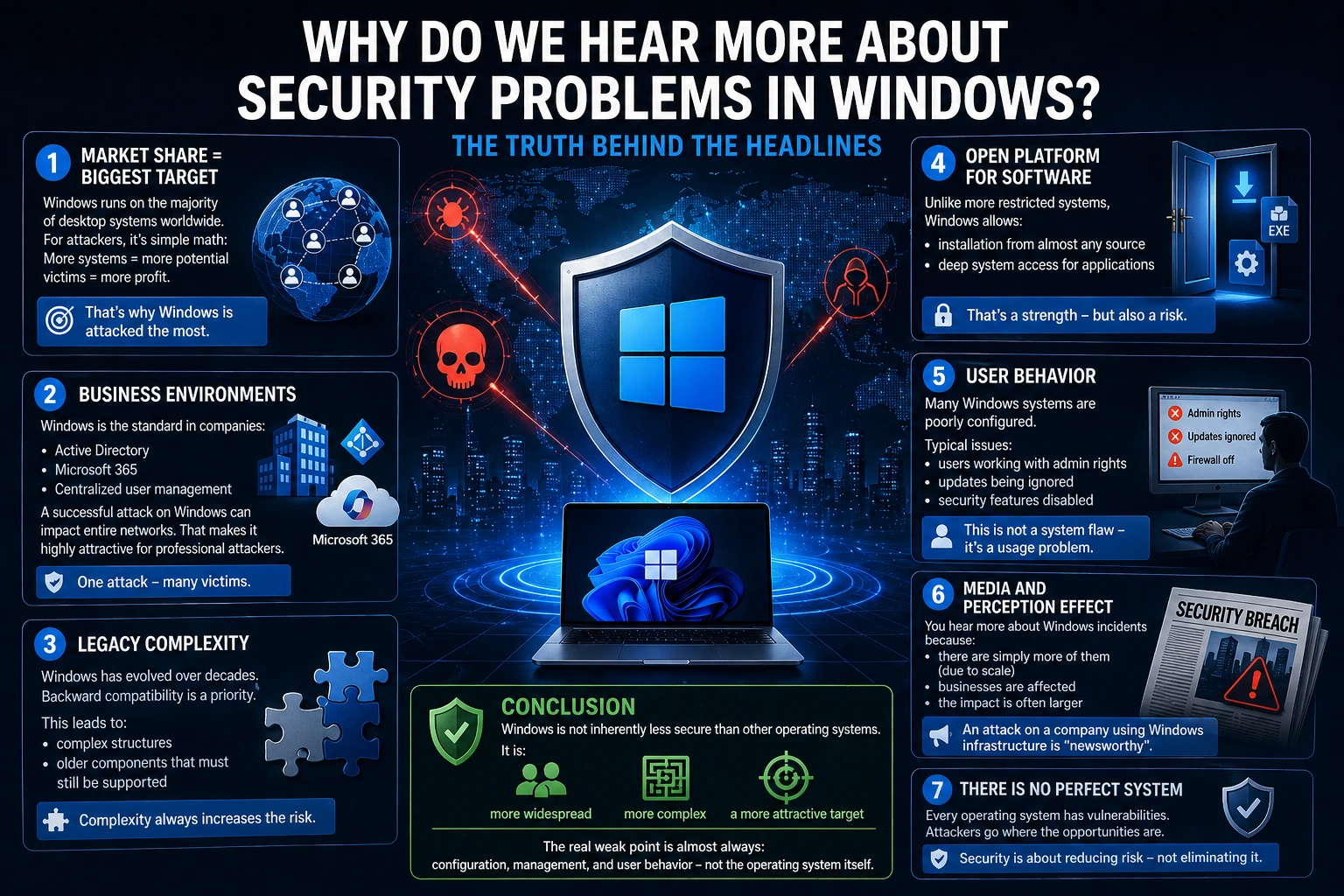
Simply put: You hear more about security problems in Windows because it is the biggest target — not because it is inherently less secure.

Here are the real reasons:

1. Market share = biggest target

Windows runs on the majority of desktop systems worldwide.

For attackers, it is simple math:

More systems = more potential victims = more profit.

That is why Windows is targeted the most.

2. Business environments

Windows is the standard in companies:

  • Active Directory
  • Microsoft 365
  • centralized user management

This means:

A successful attack on Windows can impact entire networks.

That makes it highly attractive for professional attackers.

3. Legacy complexity

Windows has evolved over decades.

Backward compatibility is a priority.

This leads to:

  • complex structures
  • older components that must still be supported

Complexity always increases the attack surface.

4. Open platform for software

Unlike more restricted systems (e.g. tightly controlled ecosystems),

Windows allows:

  • installation from almost any source
  • deep system access for applications

That is a strength — but also a risk.

5. User behavior

A critical factor:

Many Windows systems are poorly configured.

Typical issues:

  • users working with admin rights
  • updates being ignored
  • security features disabled

This is not a system flaw — it is a usage problem.

6. Media and perception effects

You hear more about Windows incidents because:

  • there are simply more of them (due to scale)
  • businesses are affected
  • the impact is often larger

An attack on a company using Windows infrastructure is far more visible than an issue on a single private device.

Conclusion

Windows is not inherently less secure than other operating systems.

It is:

  • more widespread
  • more complex
  • a more attractive target

The real weak point is almost always:

configuration, management, and user behavior — not the operating system itself.

```

The Hidden Digital World of Thailand – Between Modern Technology and Dangerous Insecurity

```

Thailand often appears extremely modern today.
People pay with QR code at street stalls, order food via app and handle banking transactions via smartphone. In some areas, Thailand even appears more digital than Germany.

But behind this modern surface there exists a big problem:
The cybersecurity of many companies and private individuals is alarmingly weak.
And that is exactly what makes Thailand an attractive target for cybercriminals.

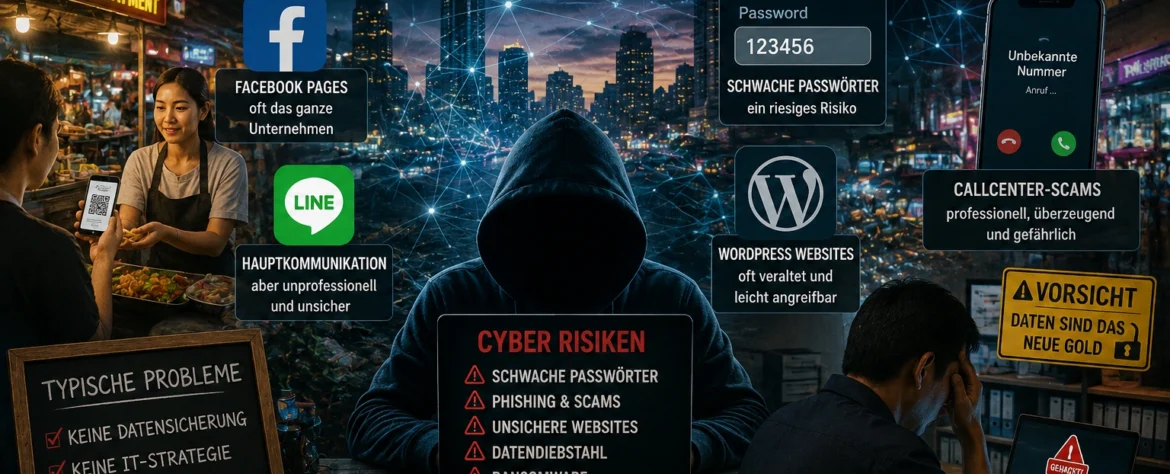
Many small companies work digitally – but insecurely

Small and medium-sized enterprises in particular use today:
• Facebook pages
• Line accounts
• cloud services
• online banking
• websites
• remote access

The problem:
Most barely understand the risks.

Company structures often consist of:
• a single password for everything
• private Gmail addresses
• unsecured WordPress websites
• employees without IT knowledge
• old routers
• missing backups

Many believe:
“We are too small to be attacked.”
That is exactly what makes them easy victims.

Facebook is for many companies the actual business

In Europe, Facebook is often only marketing.
In Thailand, however, for many small companies almost the entire business depends on it:
• customer communication
• advertising
• orders
• payment information
• messenger communication

If a Facebook account is hacked or blocked, in some cases the entire business comes to a standstill.

Particularly dangerous:
Many pages are connected to only a single private account.

If this is lost:
• the page is gone
• the advertising is gone
• customer communication is gone
• and sometimes years of work as well

Password security often hardly exists

One of the biggest weaknesses still today:
weak passwords.

Typical examples:
• 123456
• companyname2025
• phone numbers
• simple words
• identical passwords for multiple services

Even worse:
Passwords are often:
• sent via Line
• written down on paper
• shared with employees
• never changed

Many companies also have no:
• password manager
• access protection
• two-factor login
• security concept

WordPress sites are often ticking time bombs

A huge problem in Thailand:
insecure websites.

Especially WordPress installations are often:
• not updated for years
• operated with insecure plugins
• poorly configured
• used without a firewall

Many website owners only notice something when:
• Google blocks the site
• malware is distributed
• visitors see warning messages
• spam pages appear
• or suddenly pornography links appear

Often the malware has already been in the system unnoticed for months.

Call center scams are exploding in Southeast Asia

Almost everyone in Thailand now knows fraudulent calls.

Typical methods:
• alleged police
• fake bank employees
• parcel services
• tax authorities
• electricity providers

The goal is almost always:
• money transfers
• access data
• personal information

Many victims lose:
• their entire savings
• company accounts
• or access to important accounts

The professional organization of some scam networks is now alarmingly high.

AI makes the situation even more dangerous

Through artificial intelligence, fraud attempts are becoming increasingly realistic:
• fake voices
• perfect translations
• realistic-looking websites
• manipulated videos
• automated phishing emails

In the past, scam emails were often immediately recognizable.
Today, that is significantly more difficult.

Older people and small companies in particular are at risk.

Many people trust technology blindly

Another problem:
Many users automatically believe:
“If it is online, it must be secure.”

But many do not even know:
• where their data is stored
• which apps have access
• how cloud systems work
• or what risks public WLAN networks have

Free apps in particular often collect enormous amounts of personal data.

Thailand is digitally fast – but security is lagging behind

Thailand is developing extremely quickly technologically.
But security awareness is developing much more slowly.

This creates a dangerous combination:
• high digitalization
• low IT knowledge
• weak security structures
• and enormous dependence on smartphones and social media

Conclusion

Thailand’s digital world is modern, fast and impressive.
But behind this modern surface there are massive security problems that many people only notice when it is already too late.

Cybercrime today no longer affects only large corporations.

Affected are:
• small companies
• restaurants
• hotels
• online shops
• private individuals
• and even simple Facebook pages

And that is exactly why cybersecurity in Thailand will no longer be optional in the future — but vital for survival.

```