𝗘𝗨𝗥𝗢𝗧𝗩 𝗟Ä𝗗𝗧 𝗪𝗜𝗘𝗗𝗘𝗥 𝗘𝗜𝗡 𝗭𝗨 „𝗘𝗫𝗣𝗔𝗧𝗦 𝗙Ü𝗥 𝗘𝗫𝗣𝗔𝗧𝗦“ – 𝗣𝗔𝗧𝗧𝗔𝗬𝗔

```

Eine Informationsveranstaltung für deutschsprachige Expats im Großraum Pattaya.

Mit erfahrenen Spezialisten aus den Bereichen Visa & Aufenthalt, Versicherungen, Immobilien, Technik, Recht, Sprache & Kultur sowie Kulinarisches.

𝗦𝗔𝗠𝗦𝗧𝗔𝗚, 𝟭𝟬.𝟭𝟬.𝟮𝟬𝟮𝟲

16:00–18:00 Uhr – Registrierung und Gespräche

18:00 Uhr – Beginn

Route66 Diner, am Maprachan See

Navigation: https://maps.app.goo.gl/nGrE9f4XS5BBBgTa6

𝗗𝗔𝗦 𝗘𝗥𝗪𝗔𝗥𝗧𝗘𝗧 𝗦𝗜𝗘

✔⁣Eintritt frei

✔⁣Offener Austausch sowie Fragen und Antworten

✔⁣Verlosung attraktiver Preise

Das Route‑66‑Team sorgt für Ihr leibliches Wohl.

𝗕𝗜𝗧𝗧𝗘 𝗨𝗡𝗕𝗘𝗗𝗜𝗡𝗚𝗧 𝗛𝗜𝗘𝗥 𝗔𝗡𝗠𝗘𝗟𝗗𝗘𝗡 – 𝗪𝗜𝗥 𝗘𝗥𝗪𝗔𝗥𝗧𝗘𝗡 𝗪𝗜𝗘𝗗𝗘𝗥 𝗚𝗥𝗢𝗦𝗦𝗘𝗡 𝗔𝗡𝗗𝗥𝗔𝗡𝗚

https://www.etv-bkk.asia/anmeldung

𝗧𝗜𝗣𝗣

An- und Abreise mit BOLT-Taxi empfohlen.

Wir freuen uns auf einen informativen und unterhaltsamen Abend!

𝗔𝗨𝗙 𝗜𝗛𝗥𝗘 𝗙𝗥𝗔𝗚𝗘𝗡 𝗙𝗥𝗘𝗨𝗘𝗡 𝗦𝗜𝗖𝗛

𝗙𝗿𝗮𝘂 𝗟𝗮𝗱𝗱𝗮 𝗞𝗵𝗮𝗻𝗸𝗵𝗮𝗷𝗼𝗿𝗻 (𝗣𝗿𝘂)

FWD Life Insurance PCL

https://www.facebook.com/ExpatsInsuranceTH

𝗗𝗿. 𝗛𝗲𝗿𝗺𝗮𝗻𝗻 𝗤𝘂𝗶𝗻𝘁

K&S Tech Solution Ltd., Part.

www.kstech.asia

𝗛𝗲𝗿𝗿 𝗕𝗲𝗿𝗻𝗱 𝗖𝗹𝗮𝘂𝘀𝘀

NCA Solar – New Concept Asia Co., Ltd.

https://www.nca-solar.com

𝗛𝗲𝗿𝗿 𝗧𝗵𝗼𝗺𝗮𝘀 𝗦𝗶𝘁𝘇

Siam Oriental Construction

E-Mail: [email protected]

𝗛𝗲𝗿𝗿 𝗥𝗮𝗹𝗳 𝗢𝗹𝘁𝗺𝗮𝗻𝗻

Ready2Eat Bakery – German Bake For You

E-Mail: [email protected]

𝗨𝗡𝗦𝗘𝗥𝗘 𝗦𝗣𝗢𝗡𝗦𝗢𝗥𝗘𝗡

𝗕𝗬𝗗 𝗖𝗔𝗖 𝗖𝗵𝗼𝗻𝗯𝘂𝗿𝗶 𝗔𝘂𝘁𝗼𝗰𝗲𝗻𝘁𝗲𝗿

https://www.bydchonburiautocenter.com

𝗞&𝗦 𝗧𝗲𝗰𝗵 𝗦𝗼𝗹𝘂𝘁𝗶𝗼𝗻

https://www.kstech.asia

𝗜𝘁𝗮𝗹𝗔𝘀𝗶𝗮

https://www.italasiagroup.com

```

VPN, Surveillance, and Corporate Access

```

What is visible, what is not – and what can be reconstructed?

Many users assume that a VPN makes them anonymous and completely hides their origin. This is incorrect.

A VPN can improve privacy and protect traffic between your device and the VPN endpoint, but it does not provide anonymity. It also does not prevent identification through accounts, authentication systems, device information, or other available logs.

This becomes particularly relevant when accessing corporate networks from abroad, for example from Thailand.

1. DOES A VPN MAKE YOU ANONYMOUS?

Clearly: No.

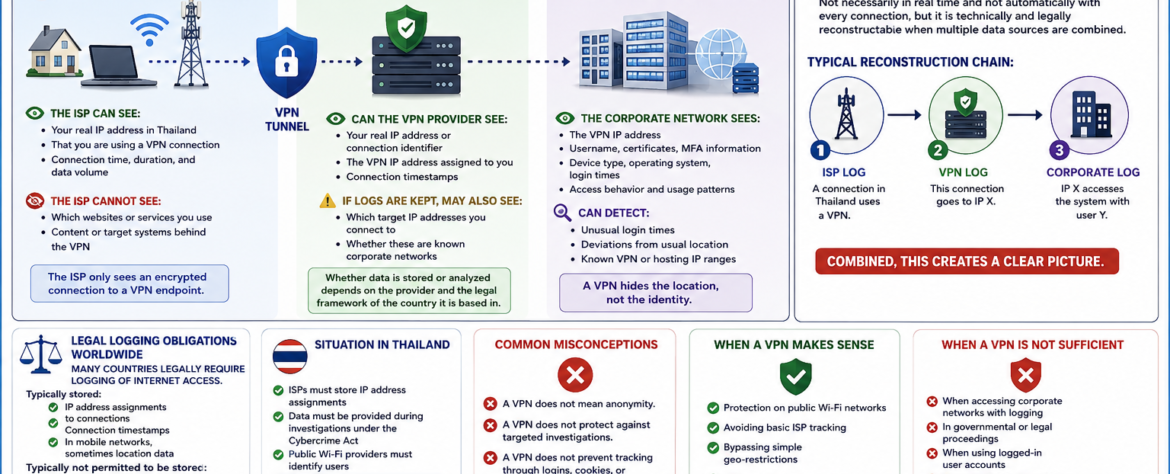
A VPN encrypts traffic between your device and the VPN endpoint. For an ordinary internet connection, this means your ISP normally cannot see the contents of the traffic inside the VPN tunnel.

However, the VPN provider becomes another party that must be trusted. Depending on the VPN technology, configuration, and logging policy, the provider may have access to connection information such as your source IP address, connection times, and the VPN endpoint used.

A VPN:

• Protects traffic against many forms of interception on untrusted networks
• Prevents your ISP from normally seeing the contents of traffic inside the VPN tunnel
• Does not replace your identity, login credentials, MFA, certificates, or device identity
• Does not make you invisible to the systems you access

A VPN improves privacy. It does not create anonymity.

2. WHO SEES WHAT WHEN USING A VPN?

Internet Service Provider (ISP) in Thailand

The ISP can generally see:

• Your real IP address or network connection
• That your device is communicating with a VPN endpoint
• Connection times and other network metadata
• The amount of traffic being transferred

The ISP normally cannot see through the VPN tunnel:

• The contents of the encrypted VPN traffic
• The specific internal resources accessed through an encrypted corporate VPN
• The contents of properly encrypted applications carried inside the tunnel

The ISP therefore sees a connection to the VPN endpoint rather than the complete activity taking place inside the VPN.

VPN Provider

Depending on the service and configuration, the VPN provider may have access to:

• Your source IP address
• The VPN IP address assigned to your connection
• Connection timestamps
• Traffic volume and other connection metadata

If the provider keeps appropriate logs, additional information may potentially be available.

However, this does not mean that every VPN provider can see everything you do. Encryption used by websites and applications, such as HTTPS, can remain in place beyond the VPN tunnel.

Whether relevant information is stored depends on the provider, its technical architecture, its logging practices, and the applicable legal framework.

Target System – For Example, a Corporate Network

The corporate network can potentially see:

• The VPN or gateway IP address from which the connection arrives
• Username and account information
• Certificates and MFA information
• Device information
• Operating system information
• Login times and access times
• Access behavior and usage patterns

A properly administered corporate environment may also detect:

• Unusual login times
• Unexpected geographic patterns or changes in normal access behavior
• Known VPN, hosting, or datacenter IP ranges
• Simultaneous or unusual sessions
• Changes in device or authentication characteristics

A VPN can hide the original network address from the target system, but it does not hide the identity used to authenticate to that system.

3. CAN IT BE DETERMINED THAT I AM ACCESSING A CORPORATE NETWORK FROM THAILAND VIA VPN?

Yes, it can be possible.

It is not necessarily possible in real time, and it is not guaranteed with every VPN configuration.

However, when relevant records from different systems exist and can legally and technically be correlated, they can potentially reconstruct where a connection originated.

A simplified reconstruction chain could look like this:

1 → ISP RECORD

A connection from Thailand establishes a connection to a VPN endpoint.

2 → VPN RECORD

The VPN provider has a record connecting that VPN session with a particular source connection or IP address.

3 → CORPORATE RECORD

The corporate system records that the VPN IP address accessed the system using user Y.

4 → CORRELATION

If the relevant records contain compatible timestamps and identifiers, the different records can potentially be correlated.

The important point is this: reconstruction depends on the existence, quality, retention, and lawful availability of the relevant records.

A VPN therefore does not make such reconstruction impossible.

4. LEGAL LOGGING OBLIGATIONS WORLDWIDE

Many countries have laws and regulations governing the retention or disclosure of certain telecommunications or computer traffic data.

The exact requirements vary considerably between countries, service providers, technologies, and circumstances.

Depending on the jurisdiction and service, records may include information such as:

• IP address assignments
• Connection timestamps
• Subscriber or account information
• Traffic or connection metadata
• Other information required by applicable law

This should not be confused with automatically recording the complete content of every communication.

Different laws apply to traffic data, subscriber information, and communication content.

5. SITUATION IN THAILAND

Thailand has legal requirements concerning the retention of computer traffic data by covered service providers.

The relevant regulations specify retention requirements for computer traffic data, with a standard minimum retention period of 90 days and provisions allowing longer retention in certain circumstances.

This does not mean that the Thai authorities continuously monitor the activity of every internet user.

It means that certain providers may have legally defined obligations to retain specified traffic information and may be required to provide information through the applicable legal process.

The exact obligations depend on the type of provider and the circumstances.

The important distinction is between continuous surveillance and the ability to reconstruct events from retained technical records.

6. COMMON MISCONCEPTIONS

A VPN does not mean anonymity.

A VPN does not prevent targeted investigations.

A VPN does not prevent tracking through logins, cookies, browser characteristics, device information, or authentication systems.

A VPN is not a legal shield.

A VPN does not erase the logs created by the systems you access.

7. WHEN A VPN MAKES SENSE

A VPN is useful for:

• Protecting traffic on public or untrusted Wi-Fi networks
• Preventing the local network from directly seeing the contents of VPN-protected traffic
• Reducing the amount of browsing information visible to the ISP
• Connecting securely to corporate or private networks
• Improving privacy in certain network environments

A VPN can therefore be an important security tool when it is configured and used correctly.

8. WHEN A VPN IS NOT SUFFICIENT

A VPN is not sufficient by itself:

• When accessing corporate systems that use authentication and logging
• When the destination system records account and device information
• When multiple systems can correlate connection records
• In governmental or legal investigations
• When legal or regulatory obligations apply

A VPN protects a network connection. It does not override the security, logging, authentication, or legal requirements of the systems involved.

9. CONCLUSION

A VPN:

• Shifts some trust from the ISP to the VPN provider
• Can hide your original IP address from the destination system
• Does not hide your authenticated identity from a corporate system
• Does not automatically prevent correlation of technical records
• Provides technical and privacy protection, not legal immunity

Anyone who believes they are “invisible” when using a VPN misunderstands the reality of modern networks and logging systems.

A VPN is a security and privacy tool, not a promise of anonymity or legal protection.

```

Comparison: Microsoft 365 Programs vs. macOS, Linux, and Freeware Alternatives

```

When looking at the topic objectively, it is not about preferences, but about tools and how they work together. Microsoft 365 is not a single program, but an integrated system. That is exactly what fundamentally distinguishes it from macOS solutions, Linux environments, and traditional freeware approaches.

The Most Important Microsoft 365 Programs at a Glance

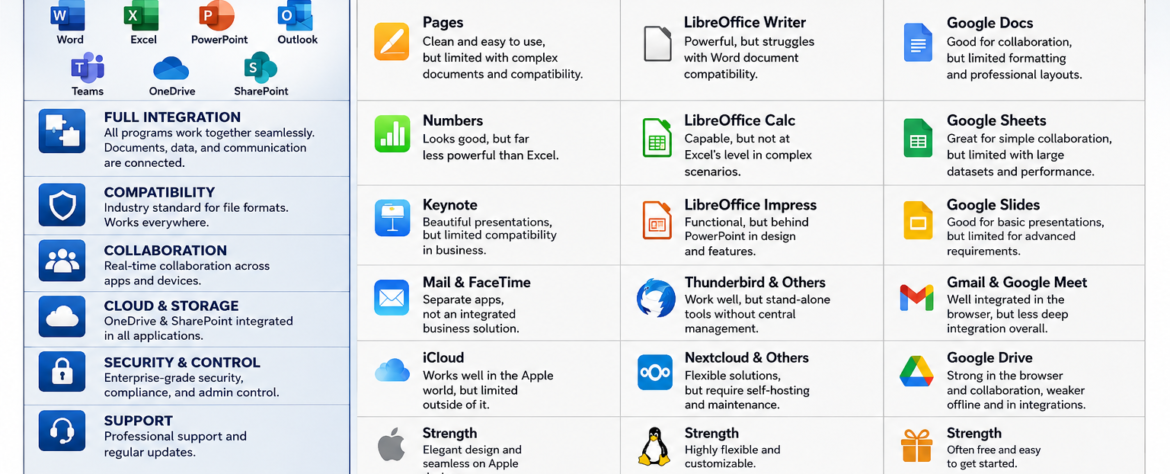
The package includes core applications for everyday work:

  • Word for word processing
  • Excel for spreadsheets and data analysis
  • PowerPoint for presentations
  • Outlook for email and calendar
  • Teams for communication and meetings
  • OneDrive and SharePoint for cloud and document management

These programs are not isolated—they work directly with each other. That is not a detail, but the core of the system.

Word Processing: Word Compared

Microsoft Word is still the benchmark for professional documents. It offers the broadest feature set, especially for complex layouts, formatting, and templates.

Apple Pages looks clean and is easy to use, but quickly reaches limits when documents become more complex or need to be exchanged with external partners.

LibreOffice Writer is functionally strong, but regularly has problems displaying Word documents accurately. That quickly becomes a problem in daily work. Google Docs is good for browser-based collaboration, but limited in formatting and professional layouts.

The reality is simple: if you need clean, compatible documents, it is hard to avoid Word.

Spreadsheets: Excel as the Industry Standard

Excel is not just a spreadsheet program, but an analysis tool. Features such as macros, Power Query, and complex formulas make it the standard solution in business.

Apple Numbers is visually appealing, but significantly limited in functionality. It is unsuitable for serious data analysis.

LibreOffice Calc can do a lot, but not at Excel’s level, especially in complex scenarios. Google Sheets is practical for simple collaboration, but quickly reaches limits with large datasets and performance.

Here too, the rule applies: Excel is the standard—everything else is a compromise.

Presentations: PowerPoint vs. Alternatives

PowerPoint is globally established and fully integrated into the Microsoft ecosystem. Content can be transferred directly from Excel or Word without disruption.

Apple Keynote is visually strong, but loses relevance in everyday business due to limited compatibility. LibreOffice Impress is functionally sufficient, but not at the same visual or technical level. Google Slides is solid for simple presentations, but limited for more advanced requirements.

In professional environments, design is not the only factor—compatibility matters too, and PowerPoint dominates here.

Email and Communication

Outlook and Teams together form a complete communication system. Emails, calendars, meetings, and files are directly connected.

Apple offers Mail and FaceTime as separate solutions, but not an integrated enterprise system. Linux commonly uses tools such as Thunderbird. These work, but are isolated and not centrally manageable. Google combines Gmail and Meet well, but remains more browser-based and less deeply integrated.

Microsoft offers a closed structure here, while other solutions consist of separate components.

Cloud and Collaboration

OneDrive and SharePoint are fully integrated into all applications. Files are centrally available, versioned, and can be edited simultaneously—locally and online.

iCloud works well within the Apple world, but is barely useful outside it. Linux solutions such as Nextcloud are flexible, but must be self-hosted and maintained. Google Drive is strong in the browser and collaboration, but shows weaknesses offline and in more complex integrations.

Microsoft combines the best of both worlds: local applications and cloud services.

The Decisive Difference: Integration

The central point is not the individual application, but how they work together.

With Microsoft 365, all components interact. A Word document is automatically stored in OneDrive, can be shared in Teams, and referenced in Outlook. Excel data can be used directly in PowerPoint without detours.

With alternatives, it looks different:

  • Apple offers a good ecosystem, but only within its own hardware world
  • Linux is flexible, but fragmented and highly dependent on configuration
  • Freeware consists of individual tools without consistent structure

The result is clear: Microsoft is a system, the others are building blocks.

Strengths of Freeware – and Its Limits

Free solutions have their place.

  • LibreOffice is capable and covers many functions
  • Google Docs is strong for collaboration
  • Tools such as WPS or Zoho are usable alternatives

But there are clear limits:

  • No consistent integration
  • Problems with format compatibility
  • No professional support
  • Limited control in enterprise environments

For private use, this is often sufficient. In professional environments, it quickly becomes problematic.

Assessment by Use Case

For private users, freeware solutions are often enough.

For small and medium-sized businesses, Microsoft 365 offers clear advantages in structure and security.

In the enterprise sector, Microsoft is effectively the standard.

Conclusion

If the comparison is made honestly, the picture is clear:

  • Freeware is inexpensive, but fragmented
  • macOS is elegant, but limited
  • Linux is flexible, but demanding

Microsoft 365 is the only system that combines everything:

  • Integration
  • Compatibility
  • Collaboration
  • Structure

Price is not the problem. What matters is what you get for it. And overall, Microsoft 365 is not more expensive—it is more complete.

```

Synchronization Reality Check: Apple Is Simpler – Microsoft Is More Flexible and Universal

```

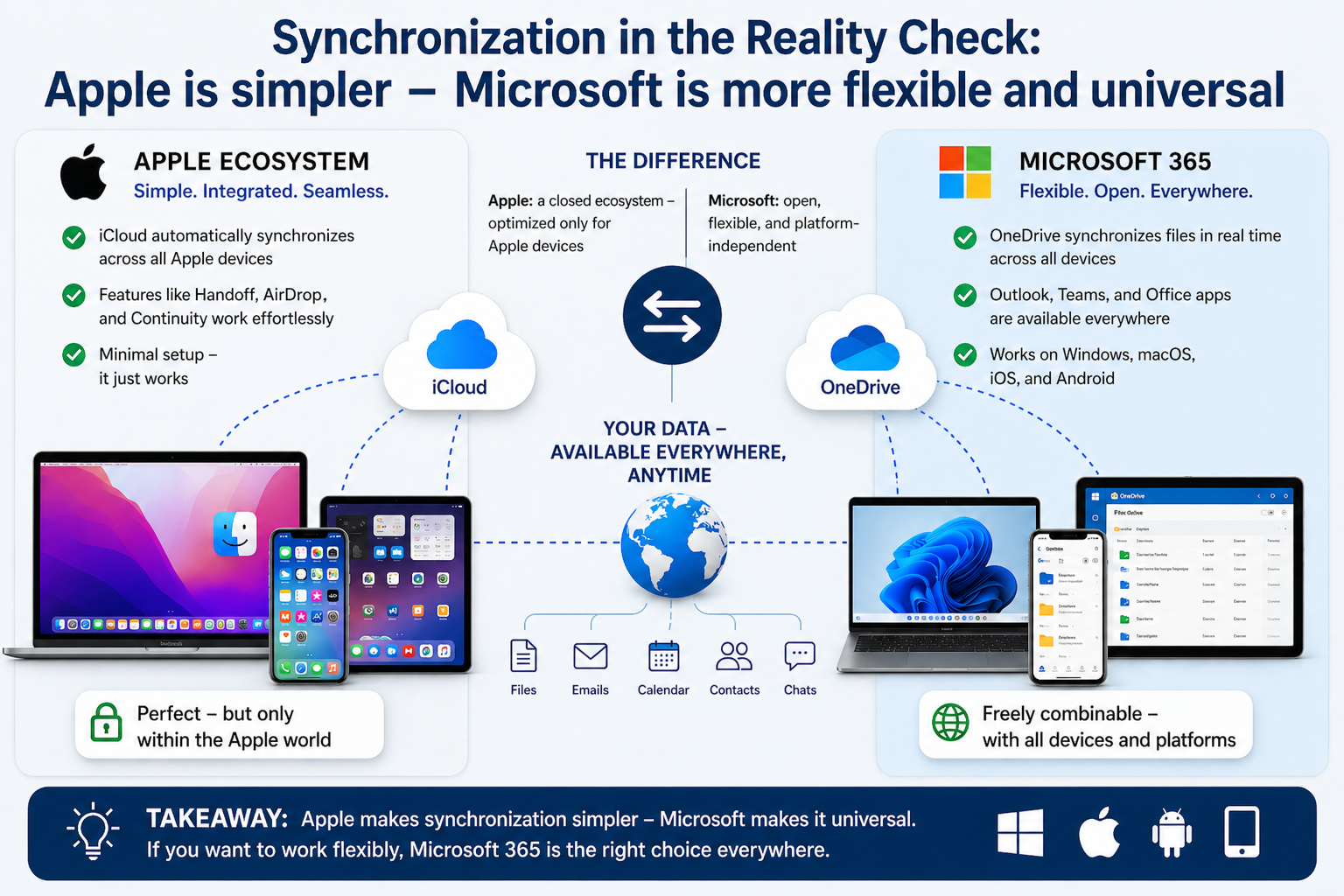
The claim made by many Mac users does not hold up that well. Apple has solved synchronization very well and very simply—but only within its own ecosystem. Microsoft can do the same, just with a different approach and in a much more open way.

How Apple Does It (macOS / iOS)

Apple relies on iCloud and close integration between devices:

  • Photos, contacts, calendars, and files sync automatically
  • Features like Handoff or AirDrop work almost “magically”
  • Setup is minimal; everything is preconfigured

This is technically elegant—but it works optimally only if you use Apple devices exclusively. As soon as Windows, Android, or other systems enter the picture, it quickly becomes limited.

How Microsoft Does It (Microsoft 365 / Windows / Mobile)

Microsoft follows a different approach: cloud-centered and cross-platform.

  • OneDrive synchronizes files in real time between Windows, macOS, iOS, and Android
  • Outlook synchronizes email, calendars, and contacts across all devices
  • Teams synchronizes chats, meetings, and files
  • Office documents are identically available everywhere—desktop, web, and mobile

The key point: Microsoft is not tied to specific hardware.

You can easily combine:

  • Windows PC in the office
  • MacBook while traveling
  • Android phone or iPhone privately

And still have the same data everywhere.

The Real Difference

Apple:

  • Extremely simple
  • Perfectly integrated
  • But closed

Microsoft:

  • Also fully synchronized
  • Requires a bit more configuration logic
  • But open and flexible

Where the Myth Comes From

Many people compare a fully optimized Apple setup with a poorly configured Windows system. That is not a fair comparison.

A properly configured Microsoft 365 system offers:

  • Automatic file synchronization (OneDrive)
  • Cross-device clipboard (Windows + Cloud Clipboard)
  • Password sync (Microsoft Authenticator / Edge)
  • Seamless document editing across all devices

The problem is usually not the technology—but the lack of proper setup.

Where Apple Truly Has the Advantage

  • Zero-configuration experience (unbox it and it works)
  • Deeply integrated device functions (for example AirDrop)
  • Consistent user interface

That is convenient, no question.

Where Microsoft Is Clearly Stronger

  • Cross-platform without restriction
  • Better integration in business environments
  • More flexible use of different devices
  • No dependency on a single manufacturer

Conclusion

  • Apple makes synchronization simpler.
  • Microsoft makes it more universal.

If someone uses only Apple products, the system may seem “better.”

But once you work realistically—with mixed devices, different requirements, and business integration—Microsoft is clearly superior.

The statement “Microsoft can’t do that” is simply false.

It works—just with fewer restrictions, and therefore with a bit more complexity.

```

THE NEXT STEP BEYOND CHATGPT & CO. – FROM AI ASSISTANTS TO AUTONOMOUS ROBOTS

```

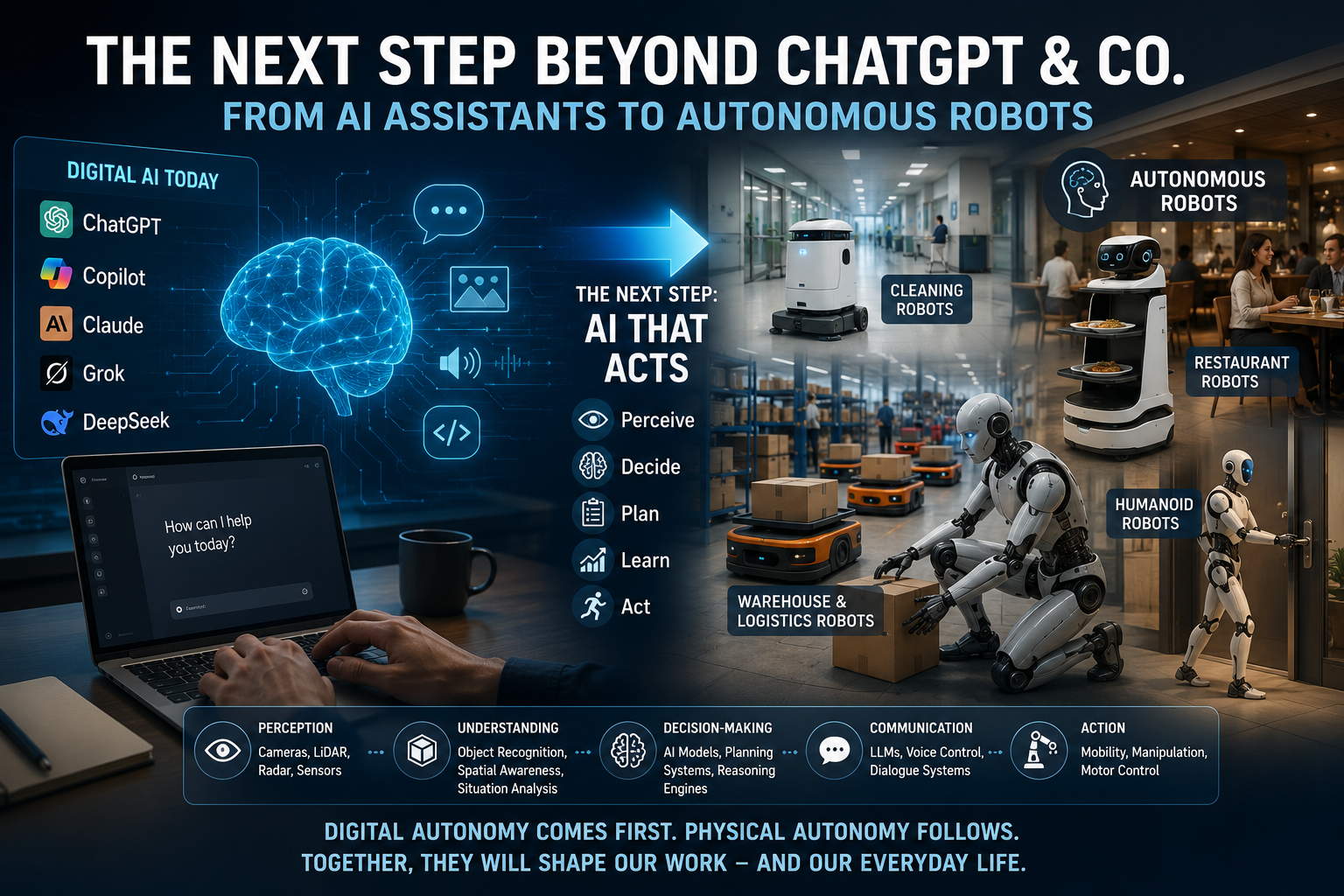
Today, when people talk about “AI,” they usually mean ChatGPT, Copilot, Claude, Grok, or DeepSeek. Strictly speaking, however, these are primarily Large Language Models (LLMs) or AI assistants built on them.

They can work with text, images, audio, and code. They generate content, analyze information, write software, and hold conversations. But an LLM is not a robot, not general artificial intelligence, and it does not understand the world the way humans do. It identifies patterns, probabilities, and relationships.

Modern AI is impressive—but it remains highly specialized.

From Digital AI to Physical AI

Most AI today is digital. ChatGPT writes; Copilot supports productivity; Claude analyzes documents; and other systems assist with research and coding.

The next major step is AI that doesn’t just respond—it acts. These systems can perceive their environment, make decisions, plan tasks, learn from experience, and operate independently. At that point, we move beyond assistants to autonomous systems.

This Is Already Happening

Autonomous machines are already in use:

  • Cleaning robots operate in hospitals, airports, hotels, and shopping centers. Most rely on sensors, maps, and predefined navigation rules rather than true intelligence.
  • Restaurant robots can deliver food and avoid obstacles but generally follow fixed routines.
  • Warehouse and logistics robots are more advanced, handling transport, route optimization, and coordinated operations with partial autonomy.
  • Humanoid robots, developed by companies such as Tesla, Figure AI, Boston Dynamics, and Agility Robotics, are being trained to perform human tasks like carrying objects, using tools, opening doors, operating equipment, and assisting people.

What Is Changing Technologically?

Traditional machines followed fixed instructions.

Modern autonomous robots combine the following:

  • Perception: cameras, LiDAR, radar, touch and ultrasonic sensors
  • Understanding: object recognition, spatial awareness, situation analysis
  • Decision-making: AI models, planning systems, reasoning engines
  • Communication: LLMs, voice control, dialogue systems
  • Action: mobility, manipulation, and motor control

This is far more than simply a “chatbot with arms.”

A Common Misconception

Many people equate AI with LLMs, but AI is much broader.

Examples of AI that do not rely on language models include:

  • Facial recognition
  • Spam filtering
  • Recommendation engines
  • Fraud detection
  • Computer vision
  • Autonomous driving
  • Predictive maintenance
  • Medical diagnostics

LLMs are only one part of the AI landscape.

What Comes First?

Many expect autonomous robots to arrive next. In reality, AI agents will likely come first.

These digital systems can already:

  • Manage schedules
  • Answer emails
  • Conduct research
  • Operate software
  • Execute business processes

Physical robots will follow, but more slowly because the real world is unpredictable. Humans instantly recognize hazards, obstacles, emotions, and unusual situations—tasks that remain extremely difficult for machines.

That is why digital AI is advancing much faster than physical autonomy.

Which Jobs Will Be Affected First?

The first major impact will not be on manual labor but on digital knowledge work, including

  • Basic customer support
  • Standard content creation
  • Routine research
  • Data analysis
  • Administrative tasks

Physical routine jobs are likely to be affected later.

The long-term future is not humans or AI, but humans working together with AI and robotics.

Conclusion

ChatGPT and similar tools are not the end goal. They are the user interface of a much larger technological shift.

The real transformation begins when AI stops simply answering questions and starts acting independently.

Digital autonomy comes first. Physical autonomy follows. And when that happens, it won’t just change how we work—it will reshape everyday life.

```

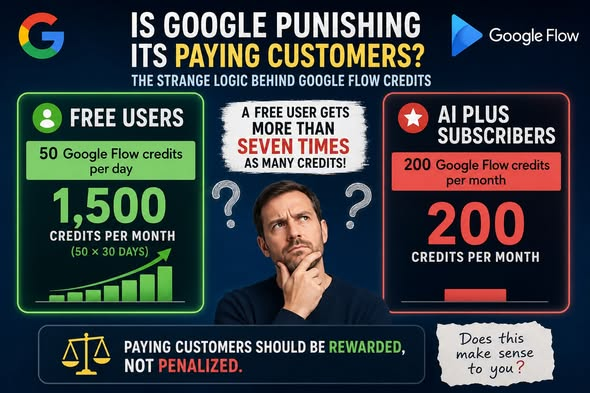
𝗜𝗦 𝗚𝗢𝗢𝗚𝗟𝗘 𝗣𝗨𝗡𝗜𝗦𝗛𝗜𝗡𝗚 𝗜𝗧𝗦 𝗣𝗔𝗬𝗜𝗡𝗚 𝗖𝗨𝗦𝗧𝗢𝗠𝗘𝗥𝗦? – 𝗧𝗛𝗘 𝗦𝗧𝗥𝗔𝗡𝗚𝗘 𝗟𝗢𝗚𝗜𝗖 𝗕𝗘𝗛𝗜𝗡𝗗 𝗚𝗢𝗢𝗚𝗟𝗘 𝗙𝗟𝗢𝗪 𝗖𝗥𝗘𝗗𝗜𝗧𝗦

```

When I first read Google’s documentation about Google Flow credits, I thought I had misunderstood it.

Unfortunately, after reading it again, the numbers still don’t make sense.

𝗧𝗛𝗘 𝗡𝗨𝗠𝗕𝗘𝗥𝗦

According to Google’s own documentation:

• Free users receive 𝟱𝟬 Google Flow credits per day.

• Google AI Plus subscribers receive 𝟮𝟬𝟬 Google Flow credits per month.

Let’s do the math.

• Free user: 𝟱𝟬 × 𝟯𝟬 days = approximately 𝟭,𝟱𝟬𝟬 credits per month.

• Google AI Plus subscriber: 𝟮𝟬𝟬 credits per month.

That means a free user has access to 𝗺𝗼𝗿𝗲 𝘁𝗵𝗮𝗻 𝘀𝗲𝘃𝗲𝗻 𝘁𝗶𝗺𝗲𝘀 as many Google Flow credits as someone who is paying for Google AI Plus.

𝗪𝗛𝗘𝗥𝗘 𝗜𝗦 𝗧𝗛𝗘 𝗜𝗡𝗖𝗘𝗡𝗧𝗜𝗩𝗘 𝗧𝗢 𝗦𝗨𝗕𝗦𝗖𝗥𝗜𝗕𝗘?

Traditionally, subscription services reward customers for supporting the platform.

Paying customers expect more features, better performance, higher limits, or additional value.

When looking only at Google Flow credits, however, the opposite appears to be true.

Why would anyone pay to receive fewer credits?

Yes, Google AI Plus includes Gemini features and additional AI capabilities. However, for customers whose primary interest is Google Flow, those extra features do not compensate for receiving 𝗱𝗿𝗮𝗺𝗮𝘁𝗶𝗰𝗮𝗹𝗹𝘆 𝗳𝗲𝘄𝗲𝗿 Flow credits.

𝗧𝗛𝗜𝗦 𝗦𝗘𝗡𝗗𝗦 𝗧𝗛𝗘 𝗪𝗥𝗢𝗡𝗚 𝗠𝗘𝗦𝗦𝗔𝗚𝗘

Whether intentional or not, this pricing model sends an unfortunate message:

“Thank you for paying. Here are fewer resources than our free users receive.”

That is difficult for customers to understand and even harder to justify.

People generally accept paying when they receive 𝗮𝗱𝗱𝗶𝘁𝗶𝗼𝗻𝗮𝗹 𝘃𝗮𝗹𝘂𝗲.

They rarely accept paying for less.

𝗔 𝗕𝗘𝗧𝗧𝗘𝗥 𝗔𝗣𝗣𝗥𝗢𝗔𝗖𝗛

Google could resolve this confusion with a much fairer model.

For example:

• Free users: 𝟱𝟬 credits per day (trial allowance)

• AI Plus subscribers: At least the equivalent monthly value—or more

• Higher subscription tiers: Significantly increased credit allocations

This would reward loyal customers instead of making them feel disadvantaged.

𝗧𝗥𝗔𝗡𝗦𝗣𝗔𝗥𝗘𝗡𝗖𝗬 𝗠𝗔𝗧𝗧𝗘𝗥𝗦

If there are technical or business reasons behind the current credit allocation, Google should explain them clearly.

Without that explanation, many users will naturally conclude that paying customers are receiving worse value than free users.

That is not the impression any company should want to create.

𝗙𝗜𝗡𝗔𝗟 𝗧𝗛𝗢𝗨𝗚𝗛𝗧𝗦

This is not about demanding unlimited credits.

It is about 𝗳𝗮𝗶𝗿𝗻𝗲𝘀𝘀 and 𝗰𝗼𝗻𝘀𝗶𝘀𝘁𝗲𝗻𝗰𝘆.

Customers who choose to support a service financially should never feel that they are getting less than those who pay nothing.

Google has built an outstanding AI ecosystem, but this particular credit structure creates unnecessary confusion and frustration.

Hopefully, Google will reconsider this policy and ensure that paying subscribers are 𝗿𝗲𝘄𝗮𝗿𝗱𝗲𝗱—not 𝗽𝗲𝗻𝗮𝗹𝗶𝘇𝗲𝗱—for their loyalty.

What do you think?

Does this pricing model make sense to you?

```

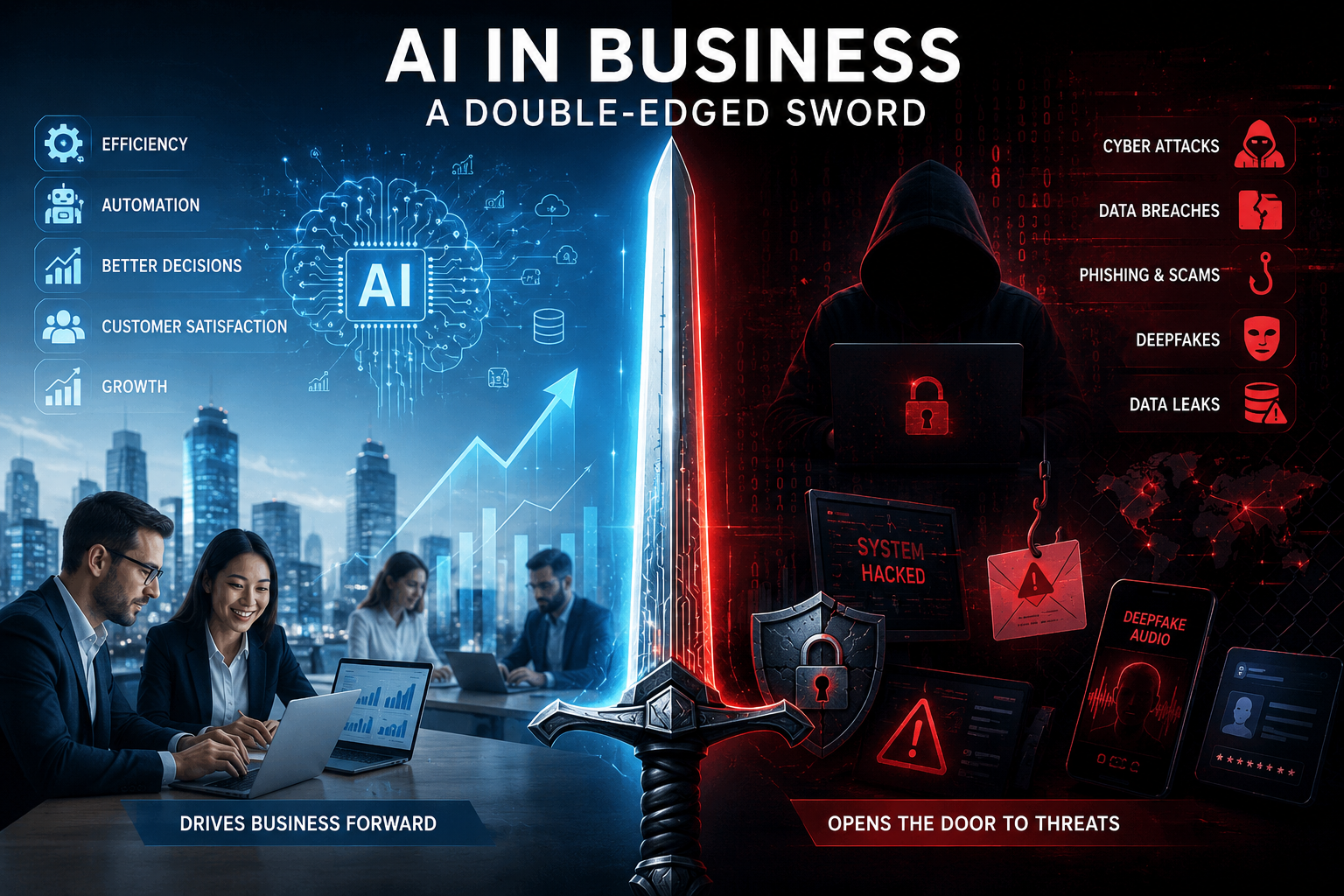
AI in Business: A Double-Edged Sword

```

Using artificial intelligence (AI) in business is like using a double-edged sword. On one side, AI helps companies work faster, save money, and improve productivity. On the other side, if AI is not used safely, it can create new opportunities for cybercriminals.

AI is no longer just a popular topic. It has become an important business tool. Companies of all sizes use AI to automate routine work, improve customer service, analyze data faster, and make better business decisions. Today, most companies are no longer asking if they should use AI. Instead, they are asking how quickly they can start using it.

There is a good reason for this excitement. AI offers many real business benefits. But like every powerful technology, it also brings new risks. If companies do not manage AI properly, the same technology that helps them grow can also help cybercriminals attack them.

AI Is Changing the Way Businesses Work

AI is changing almost every part of modern business.

Marketing teams use AI to write articles, advertisements, and social media posts. Software developers use it to write computer code. Customer service teams use AI chatbots to answer customer questions 24 hours a day. Finance departments use AI to predict future business trends, while logistics companies use it to find the fastest and cheapest delivery routes.

The benefits are clear.

AI helps companies save time, reduce costs, increase productivity, and make better decisions based on data.

Cybersecurity teams also use AI. It can examine millions of events every second and quickly find unusual or suspicious activity that people or traditional security software might miss.

It is easy to understand why AI has become such an important business tool.

Every new technology brings new risks.

Every major technology has changed the way businesses work. But every new technology has also created new security problems.

The internet made communication easier but also created cybercrime.

Cloud computing gave businesses more flexibility but introduced new security challenges.

AI is following the same path.

As companies connect AI to more business systems, they also create more ways for attackers to enter their networks. Many companies are adopting AI faster than they are protecting it, and this creates unnecessary risks.

Cybercriminals Are Using AI Too

Many people think AI only helps businesses.

Unfortunately, criminals are using the same technology.

Today, phishing emails are much more convincing than before. AI can write professional emails without spelling mistakes and can personalize every message using information from LinkedIn, company websites, or social media.

AI can also copy a person’s voice or create realistic fake videos, known as deepfakes.

In one well-known case, an employee joined what looked like a normal video meeting with company executives. In reality, everyone else in the meeting was created by AI. The employee believed the meeting was real and transferred about US$25 million to criminals.

This shows how dangerous AI-powered scams have become.

Shadow AI – A Risk Inside the Company

Not every AI risk comes from hackers.

Sometimes the biggest risk comes from employees who simply want to work faster.

Many employees copy company information into public AI tools without thinking about the consequences. They may upload contracts, customer information, financial reports, source code, or confidential business plans.

This is called Shadow AI.

Once confidential information is uploaded to a public AI platform, the company may lose control over where the data is stored, who can access it, or how long it will remain there.

For companies working with customer information, financial data, healthcare records, or valuable intellectual property, this can become a serious security and legal problem.

AI Systems Can Also Be Attacked

AI itself can become a target.

Attackers may try to change the data used to train AI systems so they make wrong decisions. They may try to steal expensive AI models or trick AI systems into ignoring security rules.

As AI becomes connected to email systems, databases, accounting software, and other business applications, the possible damage from these attacks becomes much greater.

The smarter AI becomes, the more attractive it becomes to cybercriminals.

Security Must Come First

Many companies focus on installing AI but forget to think about security.

This is like installing a high-quality alarm system while leaving the front door open.

Companies need clear rules about:

  • Which AI tools employees may use.
  • What company information may be shared with AI.
  • Who is allowed to use AI systems.
  • How AI systems are monitored and protected.

International standards such as the NIST AI Risk Management Framework, ISO/IEC 42001, and the EU AI Act can help companies build these rules.

AI security is not only the responsibility of the IT department. Company management must also be involved.

People Are Still the Best Protection

Technology alone cannot stop cybercrime.

Employees need regular training so they understand both the benefits and the risks of AI.

Companies should combine employee awareness, strong passwords, access controls, continuous monitoring, and human supervision with AI technology.

AI should help people make better decisions—not replace human thinking.

The companies that succeed will be those that combine smart technology with smart people.

The Cost of Ignoring AI Security

A successful cyberattack can cause much more than technical problems.

It can expose confidential customer information, stop business operations, damage the company’s reputation, lead to legal action, and result in large financial losses.

Winning back customer trust after a security incident can take many years.

Although investing in AI security and governance costs money, recovering from a cyberattack usually costs much more.

Conclusion

Artificial intelligence is one of the most powerful business tools ever created.

When used responsibly, it helps companies become more efficient, more innovative, and more competitive.

But if AI is introduced without proper security, it can create serious risks.

The goal is not to fear AI or avoid using it. The goal is to use AI wisely, securely, and with clear rules from the beginning.

The companies that will be most successful in the future are not necessarily those using the most AI.

They will be the companies that use AI in the safest and most responsible way.

In today’s digital world, success is not only about how fast you adopt new technology. It is also about how well you protect your business, your customers, and your valuable information.

```

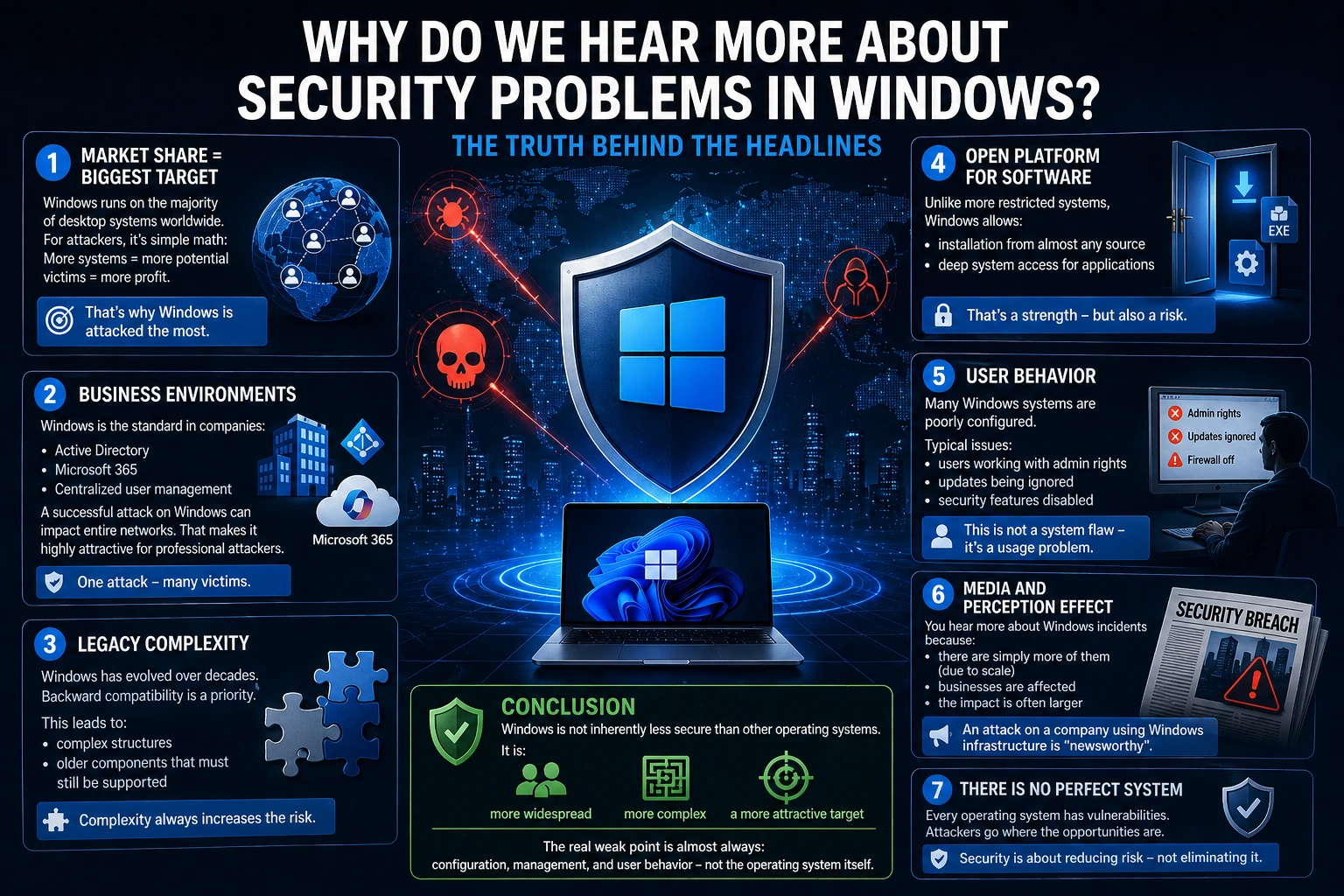
Why you hear more about security issues in Microsoft Windows – and what is really behind it

```

Simply put: You hear more about security problems in Windows because it is the biggest target — not because it is inherently less secure.

Here are the real reasons:

1. Market share = biggest target

Windows runs on the majority of desktop systems worldwide.

For attackers, it is simple math:

More systems = more potential victims = more profit.

That is why Windows is targeted the most.

2. Business environments

Windows is the standard in companies:

  • Active Directory
  • Microsoft 365
  • centralized user management

This means:

A successful attack on Windows can impact entire networks.

That makes it highly attractive for professional attackers.

3. Legacy complexity

Windows has evolved over decades.

Backward compatibility is a priority.

This leads to:

  • complex structures
  • older components that must still be supported

Complexity always increases the attack surface.

4. Open platform for software

Unlike more restricted systems (e.g. tightly controlled ecosystems),

Windows allows:

  • installation from almost any source
  • deep system access for applications

That is a strength — but also a risk.

5. User behavior

A critical factor:

Many Windows systems are poorly configured.

Typical issues:

  • users working with admin rights
  • updates being ignored
  • security features disabled

This is not a system flaw — it is a usage problem.

6. Media and perception effects

You hear more about Windows incidents because:

  • there are simply more of them (due to scale)
  • businesses are affected
  • the impact is often larger

An attack on a company using Windows infrastructure is far more visible than an issue on a single private device.

Conclusion

Windows is not inherently less secure than other operating systems.

It is:

  • more widespread
  • more complex
  • a more attractive target

The real weak point is almost always:

configuration, management, and user behavior — not the operating system itself.

```

The Hidden Digital World of Thailand – Between Modern Technology and Dangerous Insecurity

```

Thailand often appears extremely modern today.
People pay with QR code at street stalls, order food via app and handle banking transactions via smartphone. In some areas, Thailand even appears more digital than Germany.

But behind this modern surface there exists a big problem:
The cybersecurity of many companies and private individuals is alarmingly weak.
And that is exactly what makes Thailand an attractive target for cybercriminals.

Many small companies work digitally – but insecurely

Small and medium-sized enterprises in particular use today:
• Facebook pages
• Line accounts
• cloud services
• online banking
• websites
• remote access

The problem:
Most barely understand the risks.

Company structures often consist of:
• a single password for everything
• private Gmail addresses
• unsecured WordPress websites
• employees without IT knowledge
• old routers
• missing backups

Many believe:
“We are too small to be attacked.”
That is exactly what makes them easy victims.

Facebook is for many companies the actual business

In Europe, Facebook is often only marketing.
In Thailand, however, for many small companies almost the entire business depends on it:
• customer communication
• advertising
• orders
• payment information
• messenger communication

If a Facebook account is hacked or blocked, in some cases the entire business comes to a standstill.

Particularly dangerous:
Many pages are connected to only a single private account.

If this is lost:
• the page is gone
• the advertising is gone
• customer communication is gone
• and sometimes years of work as well

Password security often hardly exists

One of the biggest weaknesses still today:
weak passwords.

Typical examples:
• 123456
• companyname2025
• phone numbers
• simple words
• identical passwords for multiple services

Even worse:
Passwords are often:
• sent via Line
• written down on paper
• shared with employees
• never changed

Many companies also have no:
• password manager
• access protection
• two-factor login
• security concept

WordPress sites are often ticking time bombs

A huge problem in Thailand:
insecure websites.

Especially WordPress installations are often:
• not updated for years
• operated with insecure plugins
• poorly configured
• used without a firewall

Many website owners only notice something when:
• Google blocks the site
• malware is distributed
• visitors see warning messages
• spam pages appear
• or suddenly pornography links appear

Often the malware has already been in the system unnoticed for months.

Call center scams are exploding in Southeast Asia

Almost everyone in Thailand now knows fraudulent calls.

Typical methods:
• alleged police
• fake bank employees
• parcel services
• tax authorities
• electricity providers

The goal is almost always:
• money transfers
• access data
• personal information

Many victims lose:
• their entire savings
• company accounts
• or access to important accounts

The professional organization of some scam networks is now alarmingly high.

AI makes the situation even more dangerous

Through artificial intelligence, fraud attempts are becoming increasingly realistic:
• fake voices
• perfect translations
• realistic-looking websites
• manipulated videos
• automated phishing emails

In the past, scam emails were often immediately recognizable.
Today, that is significantly more difficult.

Older people and small companies in particular are at risk.

Many people trust technology blindly

Another problem:
Many users automatically believe:
“If it is online, it must be secure.”

But many do not even know:
• where their data is stored
• which apps have access
• how cloud systems work
• or what risks public WLAN networks have

Free apps in particular often collect enormous amounts of personal data.

Thailand is digitally fast – but security is lagging behind

Thailand is developing extremely quickly technologically.
But security awareness is developing much more slowly.

This creates a dangerous combination:
• high digitalization
• low IT knowledge
• weak security structures
• and enormous dependence on smartphones and social media

Conclusion

Thailand’s digital world is modern, fast and impressive.
But behind this modern surface there are massive security problems that many people only notice when it is already too late.

Cybercrime today no longer affects only large corporations.

Affected are:
• small companies
• restaurants
• hotels
• online shops
• private individuals
• and even simple Facebook pages

And that is exactly why cybersecurity in Thailand will no longer be optional in the future — but vital for survival.

```

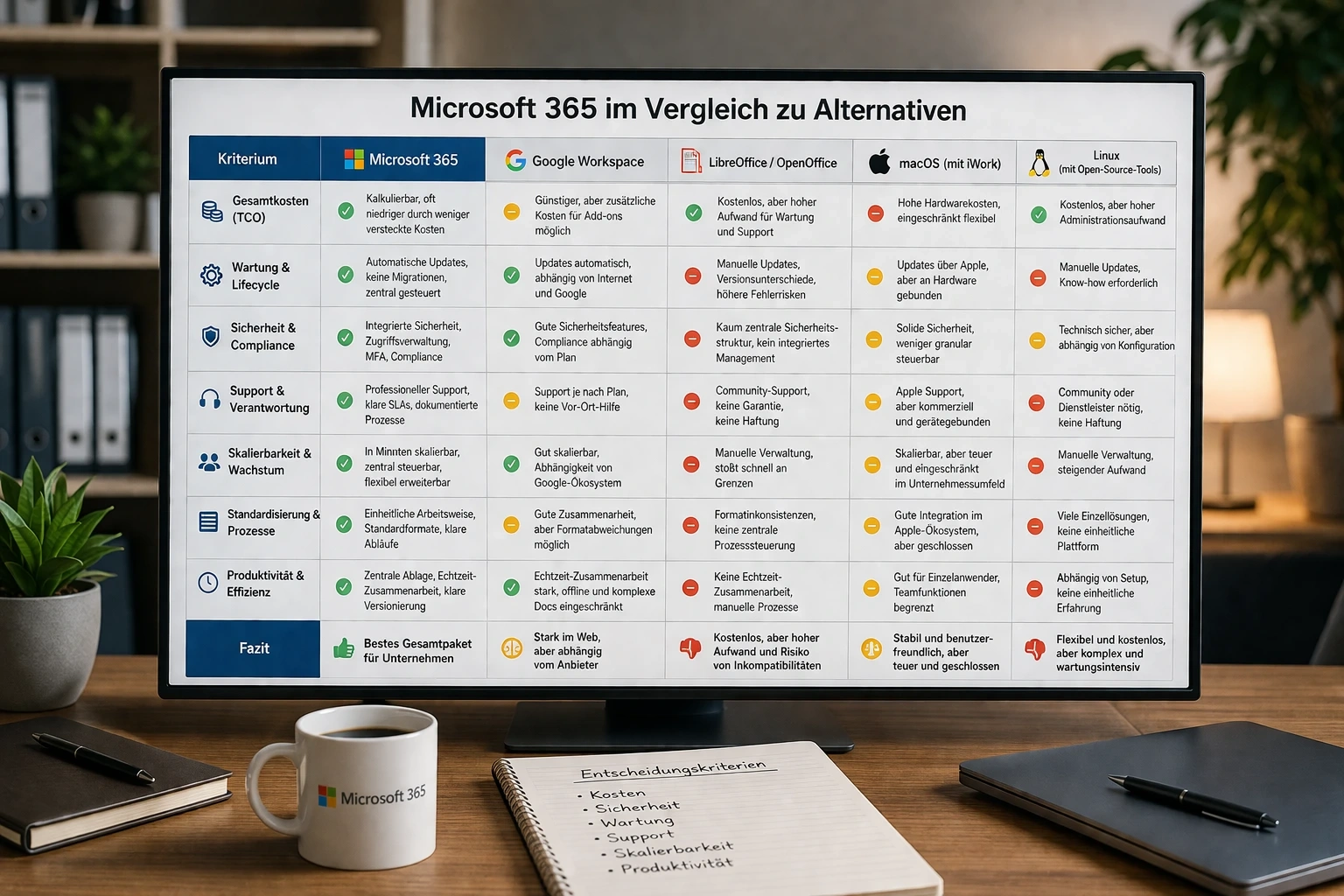
Microsoft 365 vs. Alternatives – Viewed from an IT Management Perspective

```

When making the decision at management level, it is no longer about detailed features, but about cost structure, risk, maintenance effort, and operational reliability. This is exactly where Microsoft 365 clearly separates itself from macOS solutions, Linux setups, and freeware.

1. Total Cost of Ownership (TCO)

The most common mistake is to look only at licensing costs. Microsoft 365 may appear more expensive at first glance because it involves an ongoing fee. In reality, total costs are often lower.

Why?

Because many hidden costs arise with alternatives:

  • Time lost due to incompatible documents
  • Additional effort for manual coordination
  • Extra tools for email, cloud storage, meetings
  • Internal or external IT support for setup and maintenance

Microsoft 365 combines everything into one system. Fewer interfaces mean fewer points of failure—and therefore lower costs.

With Linux or freeware, the software itself may be free, but operating costs rise: setup, maintenance, training, and support all cost time or money. This is regularly underestimated.

2. Maintenance and Lifecycle Management

Microsoft 365 removes a large part of traditional IT workload:

  • Automatic updates
  • No major version jumps or migrations
  • Centrally manageable systems
  • Consistent versions for all users

With traditional installations or freeware, it looks different:

  • Updates must be planned and tested
  • Different versions across the company
  • Manual intervention required
  • Higher risk of incompatibilities

Linux is stable, but maintenance remains manual work. macOS is simpler, but strongly tied to Apple and less flexible in a business environment.

3. Security and Risk Management

This is where it becomes business-critical.

Microsoft 365 offers:

  • Integrated security mechanisms
  • Central user and access management
  • Multi-factor authentication
  • Threat detection and automated responses

The key point: security is part of the system, not an optional add-on.

Alternatives:

  • Freeware: little or no central security structure
  • Linux: technically secure, but dependent on configuration and expertise
  • Apple: solid, but less granular control in enterprise environments

The real risk lies not in the software itself, but in misconfiguration and lack of control. Microsoft reduces exactly this risk.

4. Support and Responsibility

A point often ignored: Who is responsible when something stops working?

With Microsoft 365 you have:

  • Clearly defined support structures
  • Documented processes
  • Reliable updates and fixes

With freeware:

  • Community support
  • No guaranteed response times
  • No liability

Linux environments can be run professionally—but only with sufficient expertise or an external service provider.

In short:

Microsoft = clear point of contact

Freeware = self-responsibility

5. Scalability and Growth

A business does not remain static. Systems must grow with it.

Microsoft 365 is designed for this:

  • New users integrated within minutes
  • Permissions centrally managed
  • Services flexibly expandable

Alternatives quickly hit limits:

  • Manual user management
  • Different tools without central control
  • Increasing administrative effort

This leads to a classic problem: as growth increases, complexity rises disproportionately.

6. Standardization and Processes

Crucial in practice.

Microsoft 365 provides:

  • Consistent ways of working
  • Standardized documents
  • Clear workflows

Alternatives often lead to:

  • Different tools in use
  • Individual workflows
  • Lack of structure

The result: inefficient processes and workflows that are hard to control.

7. Productivity as an Economic Factor

The biggest cost factor is not software—but working time.

If employees must:

  • Search for documents
  • Compare versions
  • Solve avoidable problems

…then it directly costs money.

Microsoft 365 reduces exactly these friction losses:

  • Central storage
  • Real-time collaboration
  • Clear version control

That is not convenience—it is efficiency.

Conclusion

The decisive question is not:

“Which software is free?”

But:

“Which solution causes the lowest total cost while delivering maximum stability?”

And here the situation is clear:

  • Freeware saves license costs but increases operational effort
  • Linux offers flexibility but requires expertise
  • macOS is stable but limited in business contexts

Microsoft 365 delivers the best overall package of:

  • Predictable costs
  • Low maintenance effort
  • High security
  • Clear structure

This is not a matter of preference but of economic efficiency and risk minimisation.

```