When looking at the topic objectively, it is not about preferences, but about tools and how they work together. Microsoft 365 is not a single program, but an integrated system. That is exactly what fundamentally distinguishes it from macOS solutions, Linux environments, and traditional freeware approaches.
The Most Important Microsoft 365 Programs at a Glance
The package includes core applications for everyday work:
- Word for word processing
- Excel for spreadsheets and data analysis
- PowerPoint for presentations
- Outlook for email and calendar
- Teams for communication and meetings
- OneDrive and SharePoint for cloud and document management
These programs are not isolated—they work directly with each other. That is not a detail, but the core of the system.
Word Processing: Word Compared
Microsoft Word is still the benchmark for professional documents. It offers the broadest feature set, especially for complex layouts, formatting, and templates.
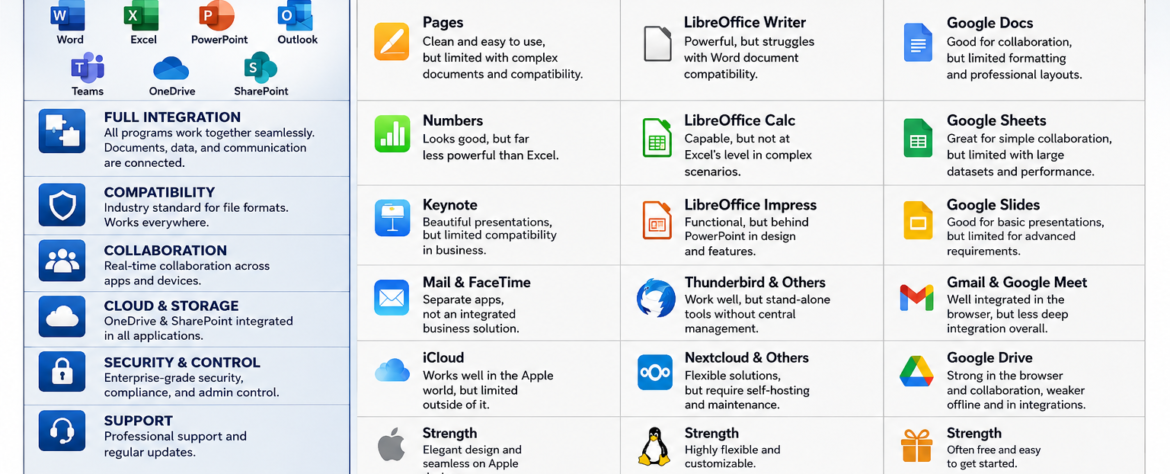
Apple Pages looks clean and is easy to use, but quickly reaches limits when documents become more complex or need to be exchanged with external partners.
LibreOffice Writer is functionally strong, but regularly has problems displaying Word documents accurately. That quickly becomes a problem in daily work. Google Docs is good for browser-based collaboration, but limited in formatting and professional layouts.
The reality is simple: if you need clean, compatible documents, it is hard to avoid Word.
Spreadsheets: Excel as the Industry Standard
Excel is not just a spreadsheet program, but an analysis tool. Features such as macros, Power Query, and complex formulas make it the standard solution in business.
Apple Numbers is visually appealing, but significantly limited in functionality. It is unsuitable for serious data analysis.
LibreOffice Calc can do a lot, but not at Excel’s level, especially in complex scenarios. Google Sheets is practical for simple collaboration, but quickly reaches limits with large datasets and performance.
Here too, the rule applies: Excel is the standard—everything else is a compromise.
Presentations: PowerPoint vs. Alternatives
PowerPoint is globally established and fully integrated into the Microsoft ecosystem. Content can be transferred directly from Excel or Word without disruption.
Apple Keynote is visually strong, but loses relevance in everyday business due to limited compatibility. LibreOffice Impress is functionally sufficient, but not at the same visual or technical level. Google Slides is solid for simple presentations, but limited for more advanced requirements.
In professional environments, design is not the only factor—compatibility matters too, and PowerPoint dominates here.
Email and Communication
Outlook and Teams together form a complete communication system. Emails, calendars, meetings, and files are directly connected.
Apple offers Mail and FaceTime as separate solutions, but not an integrated enterprise system. Linux commonly uses tools such as Thunderbird. These work, but are isolated and not centrally manageable. Google combines Gmail and Meet well, but remains more browser-based and less deeply integrated.
Microsoft offers a closed structure here, while other solutions consist of separate components.
Cloud and Collaboration
OneDrive and SharePoint are fully integrated into all applications. Files are centrally available, versioned, and can be edited simultaneously—locally and online.
iCloud works well within the Apple world, but is barely useful outside it. Linux solutions such as Nextcloud are flexible, but must be self-hosted and maintained. Google Drive is strong in the browser and collaboration, but shows weaknesses offline and in more complex integrations.
Microsoft combines the best of both worlds: local applications and cloud services.
The Decisive Difference: Integration
The central point is not the individual application, but how they work together.
With Microsoft 365, all components interact. A Word document is automatically stored in OneDrive, can be shared in Teams, and referenced in Outlook. Excel data can be used directly in PowerPoint without detours.
With alternatives, it looks different:
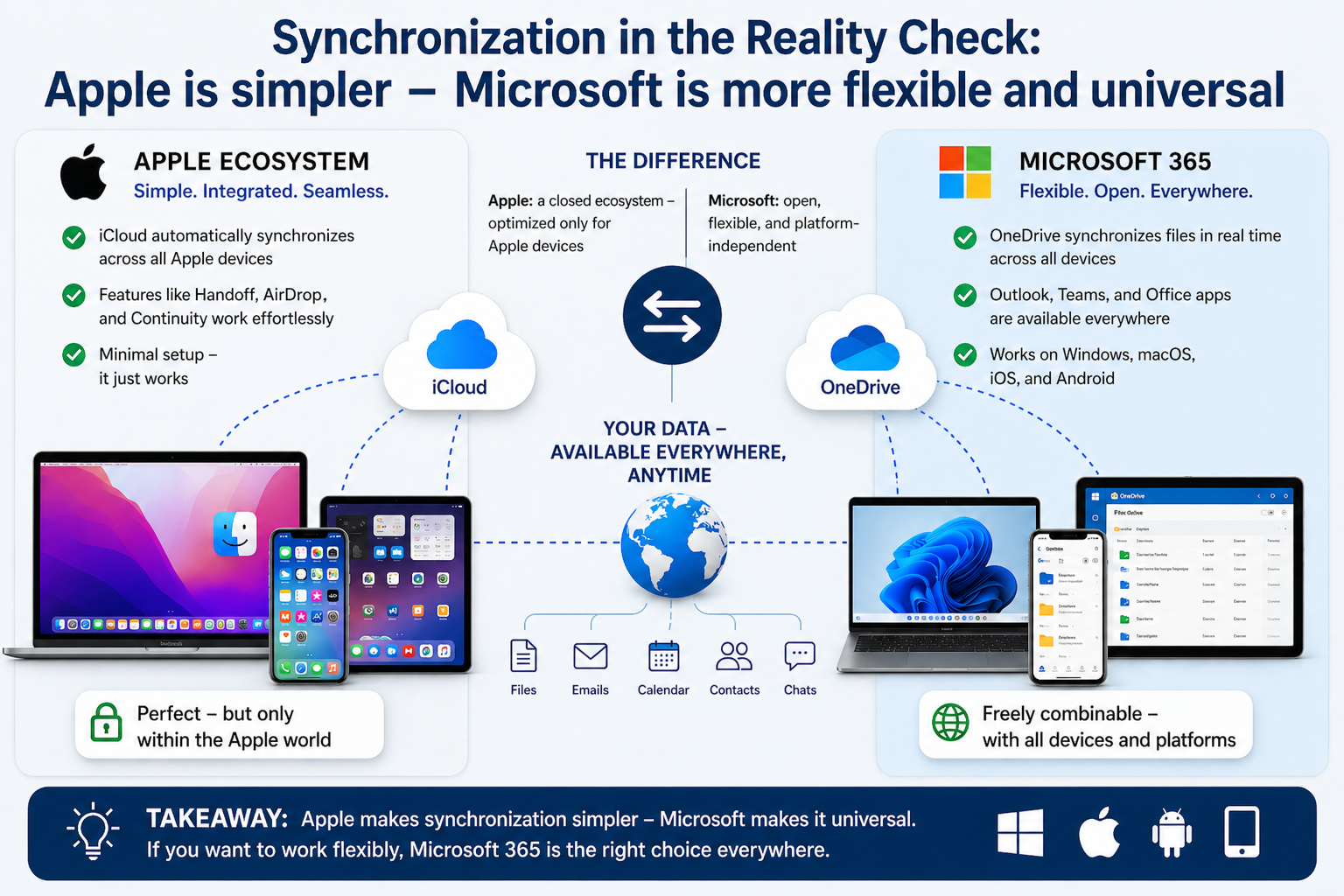
- Apple offers a good ecosystem, but only within its own hardware world
- Linux is flexible, but fragmented and highly dependent on configuration
- Freeware consists of individual tools without consistent structure
The result is clear: Microsoft is a system, the others are building blocks.
Strengths of Freeware – and Its Limits
Free solutions have their place.
- LibreOffice is capable and covers many functions
- Google Docs is strong for collaboration
- Tools such as WPS or Zoho are usable alternatives
But there are clear limits:
- No consistent integration
- Problems with format compatibility
- No professional support
- Limited control in enterprise environments
For private use, this is often sufficient. In professional environments, it quickly becomes problematic.
Assessment by Use Case
For private users, freeware solutions are often enough.
For small and medium-sized businesses, Microsoft 365 offers clear advantages in structure and security.
In the enterprise sector, Microsoft is effectively the standard.
Conclusion
If the comparison is made honestly, the picture is clear:
- Freeware is inexpensive, but fragmented
- macOS is elegant, but limited
- Linux is flexible, but demanding
Microsoft 365 is the only system that combines everything:
- Integration
- Compatibility
- Collaboration
- Structure
Price is not the problem. What matters is what you get for it. And overall, Microsoft 365 is not more expensive—it is more complete.